
1. Introduction
While using the Halo blog, I encountered a nagging little issue that had been bugging me for quite some time. Recently, I noticed that whenever I used link cards in my articles, the cover images simply failed to load, leaving the cards looking rather awkward. What’s strange is that the images themselves are accessible, yet the link cards refuse to display them. After a bit of debugging, I finally nailed down the root cause. Today, I’d like to share my troubleshooting process and some insights with you, hoping this helps anyone facing the same struggle.
2. Initial Discovery
It all started when I added a link card to an article, expecting a beautiful cover image to pop up. To my surprise, the image didn't show—I could only see the frame of the link card, but the cover area remained blank. At first, I was completely baffled. Since both the image URL and the link were working perfectly fine, the cover image should have loaded without a hitch. Why was it invisible?

Later, I noticed that when inspecting the link card in the browser, the console didn't throw any errors. This implied that the image path was correct and there were no other obvious issues. So, what exactly was going on? After digging deeper, I realized the key to the problem lay in the browser's request settings.
3. Problem Analysis
Using some debugging tools, I discovered that the issue wasn't with the image file itself. Instead, the root cause was tucked inside the <hyperlink-card> tag, which had an attribute: referrerpolicy="no-referrer". You might wonder, what's the big deal with this attribute?
referrerpolicy is an attribute that controls how much referrer information (the Referer header) the browser sends along with a request. Specifically, when set to "no-referrer", the browser is strictly forbidden from sending the Referer header. This means when the link card tries to load the image, the browser won't pass the current page's URL to the destination server. In my case, that destination server was Tencent Cloud Object Storage (COS).

Why is the Referer header so critical? The hotlink protection settings on COS require Referer information to verify whether a request originates from an authorized page. Without it, COS rejects the request, causing the image to fail. Essentially, referrerpolicy="no-referrer" was blocking the browser from passing this vital information to COS, which is why the cover image couldn't render.
4. Why avoid using an "Empty Referer"?
One might think, "Since no-referrer is so straightforward, why not just allow empty Referers in the COS settings?" The reality is that this introduces security risks. While allowing an empty Referer can fix the image loading issue, it weakens your overall security—especially when dealing with sensitive data or cross-site requests. To ensure the integrity of both your pages and assets, it's better to implement a proper policy rather than simply relaxing security controls.
5. The Solution
After this deep dive, I decided not to overthink why the <hyperlink-card> tag defaults to no-referrer. In fact, the fix is quite simple: just modify the referrerpolicy value to allow the image to load normally.


I changed referrerpolicy="no-referrer" to referrerpolicy="strict-origin-when-cross-origin". Under this setting, the browser only sends the origin information as the Referer during cross-origin requests. Simply put, it sends only the domain part, excluding the specific path and query strings. This configuration ensures that Referer information is passed when loading images while maintaining a solid balance of security.
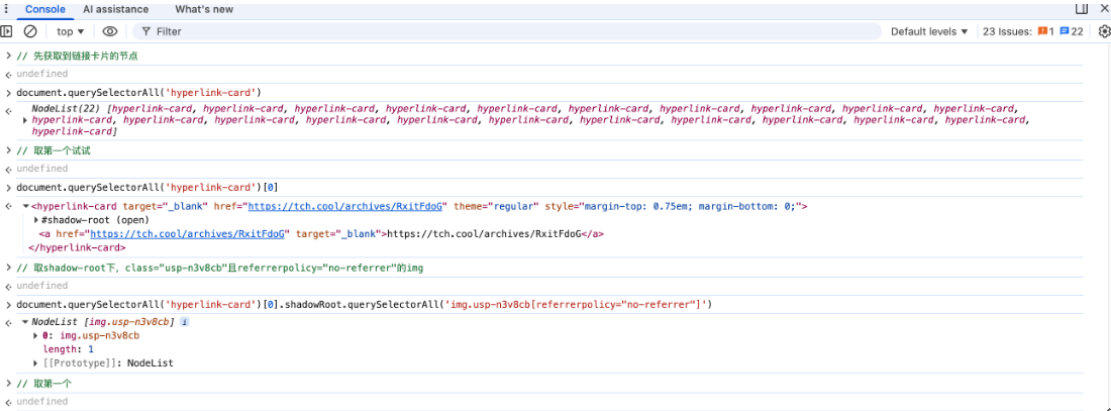
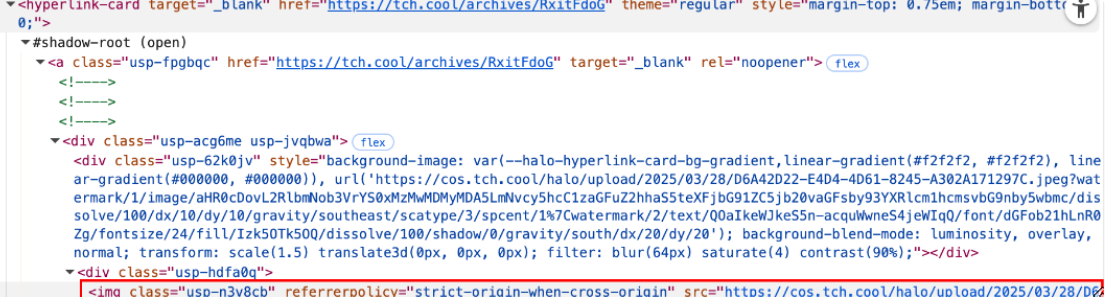
Here is the code. You just need to implement it using a forEach loop to iterate through the elements.
document
	.querySelectorAll('hyperlink-card')[0]
	.shadowRoot
	.querySelectorAll('img.usp-n3v8cb[referrerpolicy="no-referrer"]')[0]
	.setAttribute('referrerpolicy', 'strict-origin-when-cross-origin')
6. Code Implementation
Here is the solution I applied in the actual code. With the following snippet, I can modify every <hyperlink-card> tag to ensure their images use a more secure referrerpolicy setting.
// 解决链接卡片图片加载时不发送Referer头
document.addEventListener('DOMContentLoaded', function() {
    setTimeout(() => {
        const hyperlinks = document.querySelectorAll('hyperlink-card');

        hyperlinks.forEach(link => {
            if (!link.shadowRoot || link.shadowRoot.mode !== 'open') return;

            const imgs = link.shadowRoot.querySelectorAll('img.usp-n3v8cb[referrerpolicy="no-referrer"]');

            imgs.forEach(img => {
                img.setAttribute('referrerpolicy', 'strict-origin-when-cross-origin');
            });
        });
    }, 500);
});
The code above uses querySelectorAll to find all <img> elements within <hyperlink-card> tags and updates their referrerpolicy attribute to strict-origin-when-cross-origin. This timing is generally sufficient for most modern browsers.
7. Conclusion
Today’s issue is a classic example of what we often encounter in development: a seemingly tiny configuration oversight that results in a strange visual glitch. As it turns out, the fix wasn't as complex as I first imagined. By simply understanding how referrerpolicy works and how it affects cross-origin requests, a solution becomes clear.
For developers, mastering these small details helps us pinpoint and resolve bugs faster, ultimately boosting efficiency. Every time I tackle a challenge like this, I’m reminded that while the process is full of hurdles, there’s always something new to learn. I hope this share is helpful, especially for those of you using link cards or facing similar issues. If you have any questions or your own development tips, feel free to leave a comment—let’s discuss!